Mobile Trip Profile - Dropdown Selection List

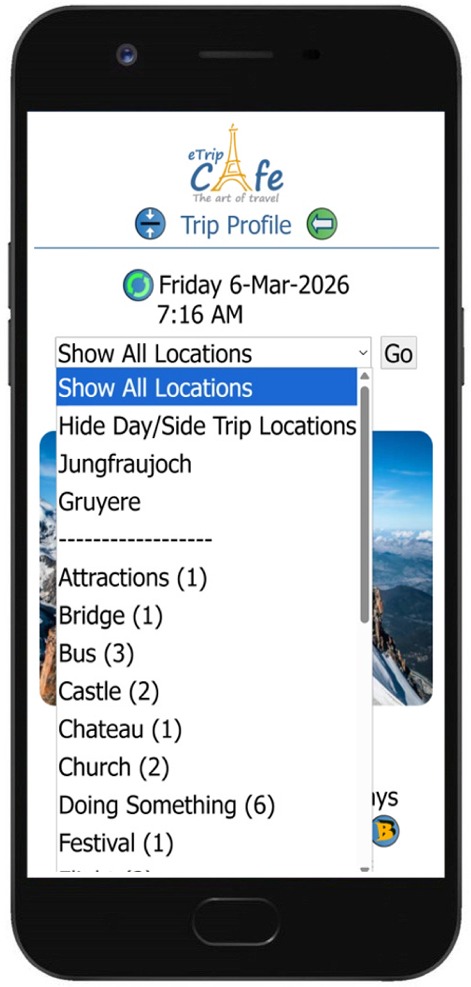
The drop down selection list on the Mobile Trip Summary page has several options to display and hide locations from the trip list.

In the below example, the trip has two Day/Side trips defined as Jungfraujoch and Gruyere.  Selecting either of these will show only the locations where they have been assigned.  There is also the option to hide all the Day/Side locations from the All Locations list.

The list shows the activities that have been assigned to locations in the trip.  There is also a count of the number of times the activity has been assigned to the different locations.  By selecting an activity and the 'Go' button, all locations will display 'expanded' and only show the selected activity.  This makes it easy to see every location where the selected activity has been assigned.

For example, if you have assigned the 'Castle' activity to different locations in your trip and select it in the list, you can easily see all the locations where you plan to visit a castle.
 
Show All Locations By default, all locations will be shown.
Hide Day/Side Trip Locations This will hide any locations defined as a Day/Side Trip.
Jungfraujoch Show only the locations where the Jungfraujoch Day/Side Trip has been assigned.
Gruyere Show only the locations where the Gruyere Day/Side Trip has been assigned.
-------------------- Spacer line separating the above options from the list of activities that have been assigned to the trip, along with the count of locations assigned.
Attractions (1) The activity 'Attractions' has been assigned to (1) location.
Bridge (1) ...
Bus (3) The activity 'Bus' has been assigned to (3) locations.
Castle (2) ...
Chateau (1) ...
Church (2) ...
Doing Something (6) The activity 'Doing Something' has been assigned to (6) locations.
Festival (1) ...